
Why Your Resume Gets Rejected Before a Human Ever Reads It
Most resumes are filtered out automatically before a recruiter opens them. Here is exactly how ATS systems work, why they reject good candidates, and how to format your resume to pass through.
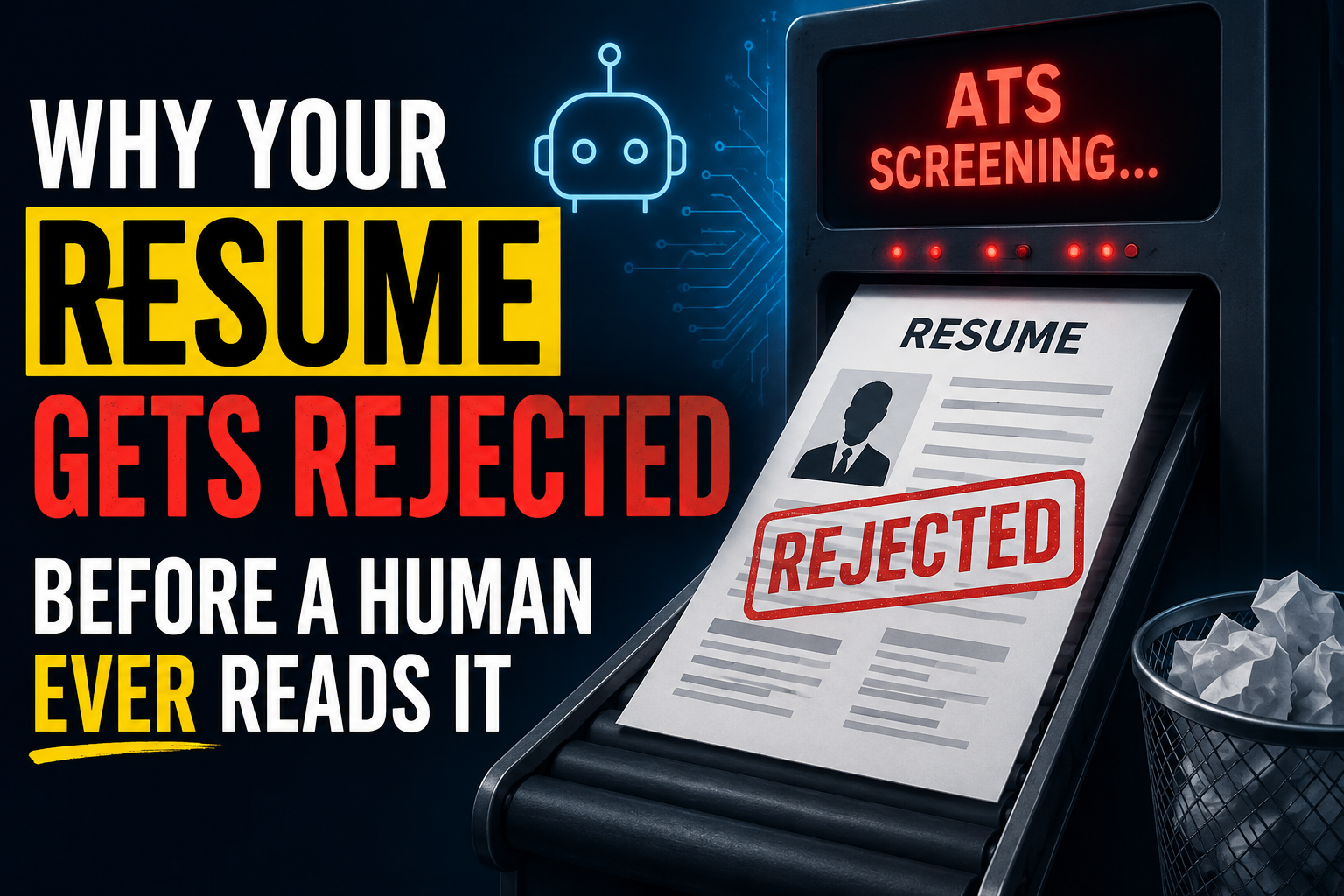
You spent three hours writing a perfect resume. You applied to forty jobs. You heard back from two.
The other thirty-eight might not have been read by a human.
I used to assume that meant I was underqualified (or that my bullets were weak). In a lot of cases, it is simpler than that: your resume gets mangled or down-ranked by software before a recruiter sees it.
Most companies use an Applicant Tracking System (ATS) to collect applications and turn resumes into structured fields. If the ATS cannot reliably read your resume, it cannot score it, and your application often sinks.
What Is an Applicant Tracking System?
An ATS is software companies use to manage job applications. When you apply, your resume is usually uploaded into an ATS before anyone looks at it (sometimes before the hiring team even knows you applied).
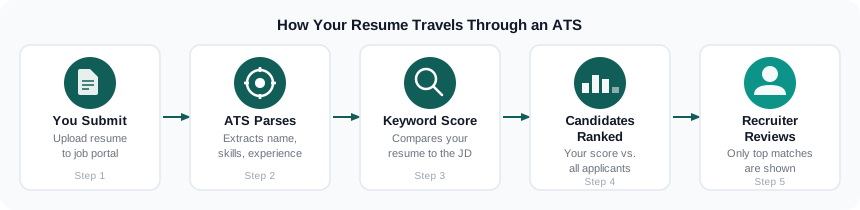
In plain terms, it does three things:
- Parses your resume into structured data (name, skills, experience, education)
- Scores your resume against the job description using keyword matching
- Ranks or filters candidates so recruiters see the strongest matches first
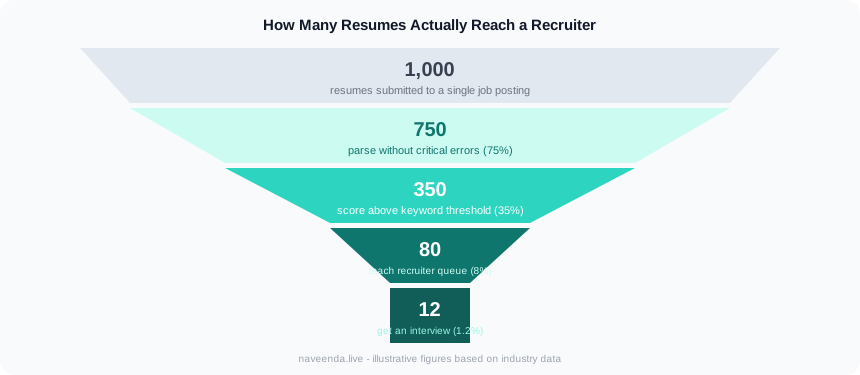
If your resume parses poorly or scores low on keywords, it can get buried. The recruiter may never see it.
Common ATS platforms you will encounter include Workday, Greenhouse, Lever, iCIMS, Taleo, and BambooHR.
Why ATS Systems Reject Good Candidates
Parsing failures
ATS parsers expect structured, plain text. When your resume uses:
- Tables or multi-column layouts: the parser reads columns left-to-right and mixes content from different sections
- Headers and footers: some parsers skip these entirely, losing your contact information
- Text inside images or graphics: completely invisible to parsers
- Fancy fonts or icons for section headings: interpreted as decorative, not structural
The result is a scrambled profile. Your job titles end up in the skills field. Your dates get dropped. The ATS cannot score something it cannot read.
Keyword mismatch
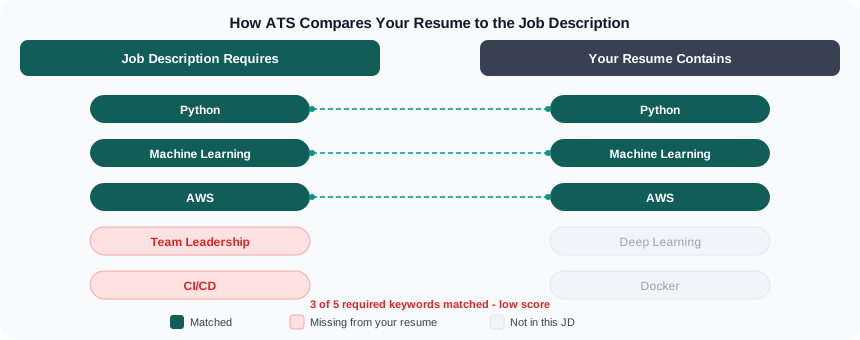
ATS systems often score resumes by comparing your text to the job description. This can be more literal than people expect.
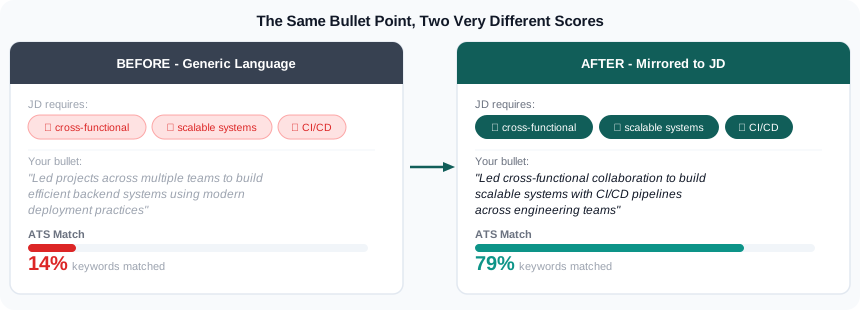
If the job asks for "machine learning" and your resume says "ML," some systems will not connect the dots. If the job says "managed cross-functional teams" and you wrote "led projects across departments," a basic keyword matcher may treat them as different ideas.
Treat the job description like a scoring rubric. The words (and phrasing) in it are the words the system is looking for.
Missing sections or non-standard formatting
ATS systems are trained on millions of resumes. They expect standard section names. Creative alternatives confuse parsers and those sections may be skipped entirely.
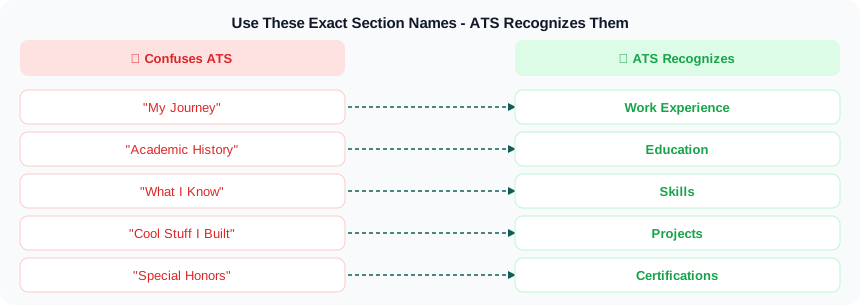
ATS Keywords That Actually Matter
Keyword strategy is not about stuffing your resume. It is about mirroring the language in the job description accurately.
How to extract the right keywords:
- Copy the job description into a text editor
- Identify nouns and technical terms: tools, technologies, methodologies, certifications
- Find the verbs used most in the responsibilities section
- Note how skills are phrased (is it "Python" or "Python programming"?)
Common high-value keyword categories:
- Technical skills: programming languages, frameworks, cloud platforms, data tools
- Methodologies: Agile, Scrum, CI/CD, MLOps, A/B testing
- Soft skills in action: "cross-functional collaboration," "stakeholder management," "executive communication"
- Metrics language: "reduced latency by," "increased revenue by," "processed X records per second"
The goal is accuracy, not volume. If the job requires five specific skills and you have four of them, use the exact phrasing from the JD for all four.
Formatting Mistakes That Get You Filtered Out
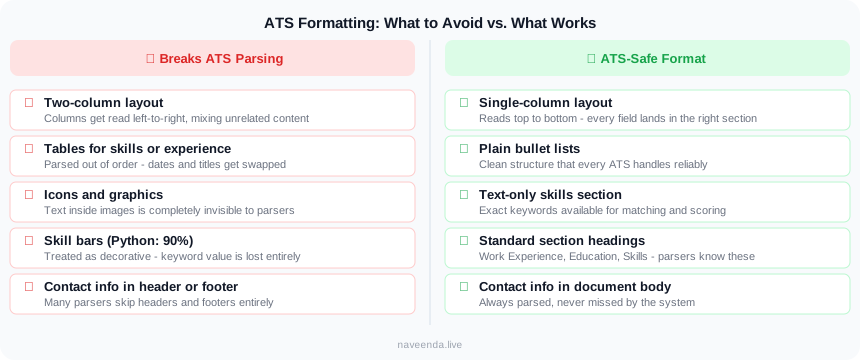
These are the most common structural mistakes that kill resume performance in ATS:
1. PDF vs. DOCX Some older systems parse DOCX more reliably than PDF. Unless the posting explicitly asks for PDF, DOCX is often the safer default. If the portal allows it, you can also upload both (or test which one previews cleanly inside the application form).
2. Multi-column layouts A two-column resume looks clean to a human. To an ATS, the columns are read as a single stream of text, mixing your skills column with your experience column. Use single-column formatting.
3. Graphics, icons, and infographics Skill bars showing "Python: 90%" look impressive visually. ATS systems see nothing. List skills as plain text.
4. Embedded tables Tables are common for organizing skills or formatting work history neatly. Most ATS parsers handle them poorly. Use plain bullet points.
5. Nonstandard section headers Stick to: Work Experience (or Professional Experience), Education, Skills, Certifications, Projects. Anything else risks being skipped.
6. Missing dates ATS systems calculate tenure and total experience using dates. If you omit month or year from a job entry, the system may score your experience as zero for that role.
How to Tailor Your Resume for Each Application
This is the step most people skip because it takes time. It also tends to move the needle more than rewriting your entire resume from scratch.
The process:
- Read the job description top to bottom before editing anything
- Identify the top five to seven skills or requirements emphasized most
- For each one you actually have, find it on your resume and rephrase it to match the JD's language exactly
- Add a Skills section near the top if you do not have one, listing the technical keywords explicitly
- Adjust your summary or objective (if you have one) to reflect the specific role
This does not mean fabricating experience. It means describing the same work using the terms the posting uses, so the system can recognize it.
An ATS-Friendly Resume Checklist
Before you submit, run through this:
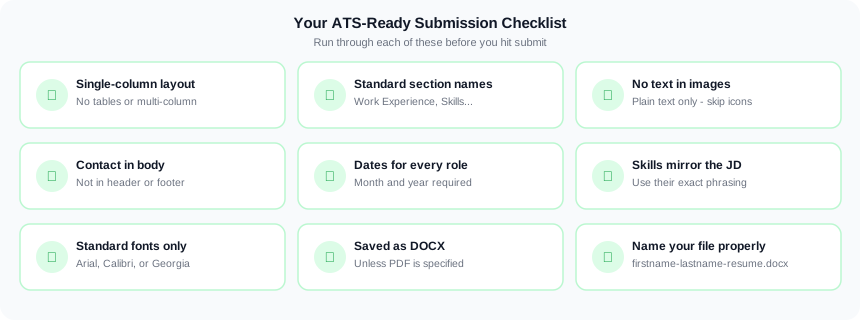
- Single-column layout with no tables
- Standard section headings (Work Experience, Education, Skills)
- No text inside images or icons
- Contact info in the body, not in a header or footer
- Dates included for every role (month and year)
- Skills section with exact keywords from the job description
- No fancy fonts (stick to Arial, Calibri, Georgia, or similar)
- Saved as DOCX unless PDF is specifically requested
- File name includes your name (e.g.,
naveen-da-resume.docx, notresume-final-v3.docx)
Check Your Resume Before You Submit
Manually auditing your resume against every job description is tedious. Tools like ResumeGrade run your resume through an ATS simulation, score it against a job description, and surface specific gaps. It takes a couple minutes and gives you a clear list of what to fix before you apply.
The goal is not a perfect score. The goal is getting in front of a human. Fix the filters first, then let your experience do the work.
Naveen DA is a machine learning engineer. ResumeGrade helps students and job seekers optimize their resumes for ATS systems and improve their shortlist rates.